Complete Casino in Your Browser
The full game lobby, cashier, bonus section, live chat, and account settings are all available through Safari, Chrome, Firefox, or Samsung Internet on any phone or tablet.
Jeet City on Mobile
The full Jeet City Casino experience on your phone or tablet - no app store, no download, no storage used. Open Safari or Chrome, go to jeetcity24.com, and play 10,000+ pokies and live dealer tables instantly.
Play Anywhere, No Download Needed
The full Jeet City Casino experience on your phone or tablet - no app store, no download, no storage used. Open Safari or Chrome, go to jeetcity24.com, and play 10,000+ pokies and live dealer tables instantly.
Launch on Mobile Play responsibly - gambling carries a risk of addiction. Must be 18+ to play. Bonus offers are subject to terms and conditions.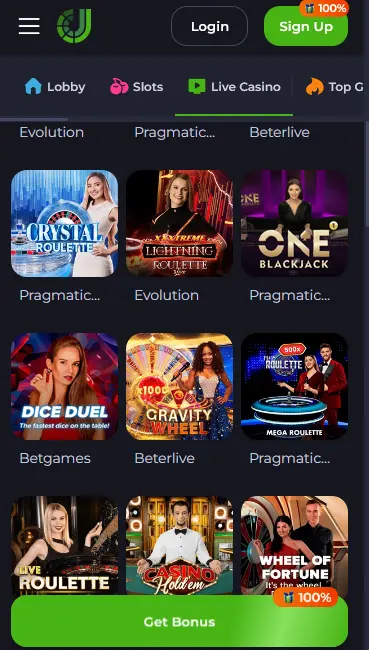
How to Add Jeet City to Your Home Screen
Mobile Account Security
What You Should Do
What You Should Avoid
Mobile Experience Overview
Pros
Cons
What Mobile Delivers
Complete Casino in Your Browser
The full game lobby, cashier, bonus section, live chat, and account settings are all available through Safari, Chrome, Firefox, or Samsung Internet on any phone or tablet.
Fast Load Times
Pokies open in under five seconds on a standard 4G connection. Live dealer streams from Evolution Gaming and Pragmatic Play Live maintain HD quality across mobile networks without buffering.
Secure Mobile Sessions
256-bit SSL encryption covers every mobile session. Two-factor authentication and biometric login (where supported by the device) add extra layers of account protection on mobile.
Mobile Compatibility
Android
iOS
Jeet City delivers the complete casino experience through a mobile-optimised browser interface built on HTML5, meaning every feature available on a desktop is also available on a phone or tablet - no compromises. The lobby loads with the full filter set intact: search by game provider, volatility, bonus mechanics (Bonus Buy, Hold and Win, cluster pays), and category. The cashier accepts all supported payment methods including cryptocurrency deposits in Bitcoin, Ethereum, Litecoin, and USDT. Bonus management, live chat support, KYC document uploads, and account security settings are all accessible directly from mobile.
The primary difference is that no file is downloaded to the device and no storage space is consumed. A native app would be updated by the app store; the Jeet City browser version updates automatically whenever the server is refreshed, meaning players always access the latest version without any manual action. The PWA shortcut option bridges the gap between a browser bookmark and a native app by enabling full-screen mode, removing the browser address bar, and (where supported) delivering push notifications for promotional updates.
Open jeetcity24.com in Chrome, tap the three-dot menu in the top-right corner, and select “Add to Home Screen.” A dialog box will appear asking you to name the shortcut. Confirm with “Add” and the Jeet City icon will appear on your Android home screen. Tapping it opens the site in full-screen mode, behaving identically to a native app except that no installation occurred and no storage was used.
Open jeetcity24.com in Safari on an iPhone or iPad. Tap the Share icon, which appears as a box with an upward arrow along the bottom toolbar. Scroll through the share sheet options and select “Add to Home Screen.” Confirm the name and tap “Add” in the top-right corner. The Jeet City shortcut appears on the home screen and opens in full-screen Safari without the browser chrome visible.
The shortcut is optional. jeetcity24.com bookmarked in any browser delivers identical gameplay, cashier access, and account management. Players who prefer to keep their home screen clear can bookmark the login page in their browser and access it the same way as any website. There is no functional difference in the gaming experience between a PWA shortcut and a browser bookmark.
The Jeet City platform runs on all current mobile operating systems and most browsers released within the last four years. Recommended specifications are Android 8.0 or higher with Chrome 90 or later, and iOS 13 or higher with Safari 14 or later. Chrome for iOS is also supported, though Safari is the recommended browser on Apple devices because it delivers the fastest PWA experience and the most consistent live stream quality.
| Platform | Recommended Browser | Minimum OS | PWA Support |
|---|---|---|---|
| Android | Chrome 90+ | Android 8.0 | Yes, via Chrome |
| iOS | Safari 14+ | iOS 13 | Yes, via Safari |
| iPad | Safari 14+ | iPadOS 13 | Yes, via Safari |
| Windows Mobile | Chrome / Edge | N/A | Yes |
The full pokie library from Pragmatic Play, Play’n GO, NetEnt, BGaming, Hacksaw Gaming, Nolimit City, and over 100 additional studios is accessible on mobile. Game controls are scaled for touch interaction, and load times average under five seconds on a standard 4G connection. High-volatility Megaways titles and Bonus Buy games perform identically on mobile compared to desktop, with no reduction in the RTP or in the mechanics available.

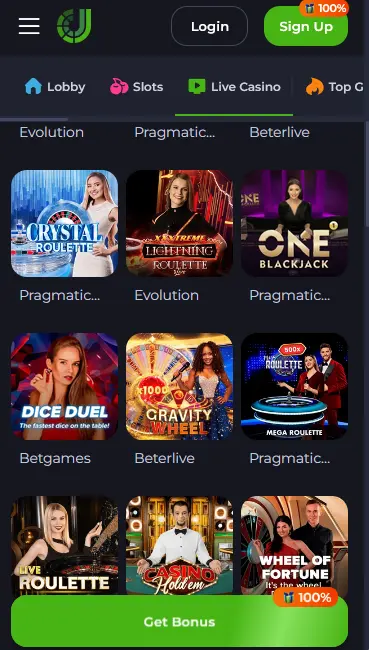
Live dealer streams from Evolution Gaming and Pragmatic Play Live maintain HD video quality on mobile networks. Lightning Roulette, Crazy Time, Gravity Blackjack, Speed Baccarat, and Monopoly Live all run smoothly on phones with a stable connection. The betting interface scales to touch input, with chip placement and side bet toggles sized for thumb navigation.

RNG-based blackjack, roulette, baccarat, and video poker all load instantly on mobile. Crash titles from Spribe (including Aviator) and SmartSoft are particularly well-suited to mobile play given their short round format. The betting interface on crash games is designed for portrait orientation on smaller screens.
The welcome package - 100% match up to AU$7,500 plus 100 free spins on Book of Nile: Hold’n’Link on the first deposit - is fully claimable through mobile. The cashier accepts promo codes JEET75 and JEET50 for the second and third deposit bonuses in exactly the same way as on desktop. Weekly promo codes MONDAY and WEDNESDAY can also be entered through the mobile cashier. All bonus management, including checking remaining wagering requirements and free spin balances, is available from the account Bonus section on mobile. 18+ only. 40x wagering applies.
Claiming the Jeet City welcome bonus through mobile follows the same steps as on desktop. Register and verify the account, navigate to the Cashier via the menu icon, select Deposit, enter any applicable promo code before confirming the transaction, and deposit at least AU$30. The match bonus and free spins are credited to the account automatically. 18+ only.
All payment methods supported on desktop are available in the mobile cashier: Visa, Mastercard, Skrill, Neteller, Neosurf, Flexepin, eZeeWallet, and the full range of cryptocurrencies including Bitcoin, Ethereum, Litecoin, Tether (USDT), and USD Coin (USDC). Crypto wallet addresses can be copied directly from the mobile cashier screen.
| Method | Deposit Time | Withdrawal Time |
|---|---|---|
| Bitcoin / Litecoin | Instant | Up to 24 hours |
| Ethereum / USDT / USDC | Instant | Up to 24 hours |
| Skrill / Neteller / eZeeWallet | Instant | 1 to 3 business days |
| Visa / Mastercard | Instant | 3 to 5 business days |
| Bank Transfer | Instant | 3 to 5 business days |
Every transaction in the mobile cashier is protected by 256-bit SSL encryption. Cryptocurrency transactions route through the blockchain network rather than through banking infrastructure, which removes the risk of card-level fraud. Two-factor authentication, if enabled, applies to all cashier actions as well as login, adding a second verification step before any withdrawal request is submitted.
The registration form on mobile loads as a single-screen flow. Enter an email address, create a password, and select AUD as the account currency. A verification message is sent to the registered email address; tap the confirmation link and the account becomes active. The entire process typically takes under three minutes on a mobile connection.
Tap the Login button from the jeetcity24.com homepage or from the PWA shortcut on your home screen. Enter your registered email and password. If two-factor authentication is enabled, a code will be sent to the registered phone number or email; enter this code to complete the login. Biometric login (fingerprint or Face ID) is available on supported devices if the browser has permission to access biometric authentication.
All Jeet City mobile sessions are encrypted with 256-bit SSL, the same standard used by online banking applications. Two-factor authentication, enabled through the account security settings, requires a time-sensitive code on every login and before withdrawal requests are submitted. Biometric authentication support depends on the device’s capabilities and browser permissions. Automated session timeouts log accounts out after a period of inactivity, which limits exposure in the event of a phone being left unattended. For lost or stolen devices, changing the account password immediately via the password reset function on the login screen is the fastest way to secure the account.
Live chat is fully functional in the mobile browser and connects to the support team within seconds. The email form at [email protected] is accessible from the account Help section on mobile. Responsible gaming tools including deposit limits, session length limits, and self-exclusion are available in the account settings on mobile and function identically to the desktop versions. Deposit limit reductions apply immediately; increases require a cooling-off period before becoming active. Any player who is finding gambling difficult to control is encouraged to use the self-exclusion tool or reach out to the support team at [email protected].
Mobile Access Questions
No. Jeet City does not have a native app on the App Store or Google Play. The casino runs fully in your mobile browser, and a PWA shortcut can be added to the home screen from Safari on iOS or Chrome on Android.
The complete lobby is accessible on mobile, including all pokies from Pragmatic Play and Play'n GO, live dealer tables from Evolution Gaming and Pragmatic Play Live, jackpot games, crash titles from Spribe, and the full cashier.
No. The mobile browser version works on Android 8.0 (Oreo) or higher and iOS 13 or higher. More recent OS versions deliver the smoothest experience, but the platform functions across a wide range of devices.
Open Jeet City on Your Phone Now
Grab 100% up to A$10,000 and 180 free spins.
Enter the Casino Play responsibly - gambling carries a risk of addiction. Must be 18+ to play. Bonus offers are subject to terms and conditions.